
Download SpeedSim – Ogame Battle Simulation, Fleet Strategy, Battle Outcome Prediction
Overview
SpeedSim is a specialized mobile application designed for players of Ogame, a popular space-based strategy browser game. Its primary purpose is to simulate battles within the game environment, enabling users to predict outcomes before engaging in actual combat. By entering fleet compositions, players can receive detailed forecasts on expected losses, debris production, and even the likelihood of moon formation. This functionality transforms strategic decision-making from a gamble into a calculated process, reducing risk and improving long-term planning.
The app targets Ogame enthusiasts who rely on precise fleet management and tactical foresight to succeed in competitive gameplay. It is particularly useful for players preparing for large-scale attacks, defending against invasions, or optimizing resource allocation. While the developer’s background is not publicly detailed, the app’s longevity—first released in 2006—suggests a dedicated user base and proven utility within the Ogame community. Its consistent presence over nearly two decades highlights its reliability and relevance in the game’s ecosystem.
Real-world use cases include pre-battle analysis for alliance raids, testing fleet configurations without risking real resources, and evaluating the impact of technological upgrades. In a game where every unit and energy point matters, SpeedSim serves as a critical planning tool. It enhances the player experience by adding depth to strategy, making it an essential companion for both casual and advanced Ogame players.
Key Features & Functionality
SpeedSim delivers a focused set of tools tailored to the tactical needs of Ogame players. The core functionality centers on battle outcome simulation, allowing users to input attacker and defender fleet details to generate predictive reports. This feature is especially valuable for assessing the viability of an attack before committing resources.
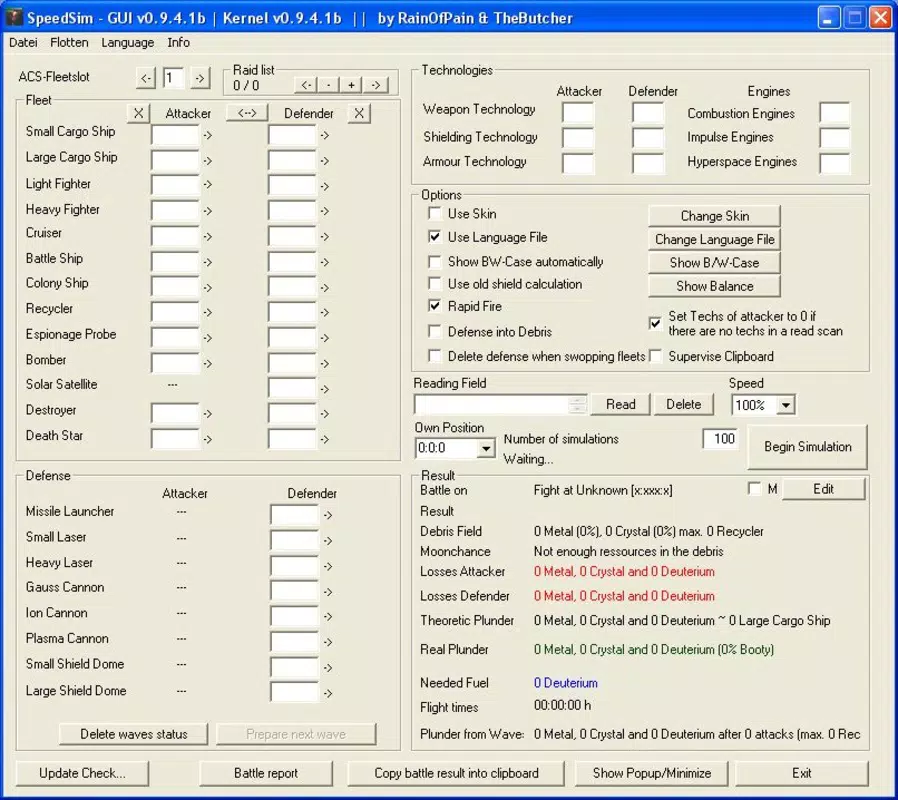
- Battle Outcome Simulation: Users can enter fleet compositions, including ships, weapons, and defensive units, to simulate combat results. The simulation accounts for fleet balance, shield strength, and damage output, producing realistic predictions.
- Detailed Reporting: The app generates comprehensive reports that include unit losses for both sides, debris field estimates, and probabilities of moon formation. These insights help players evaluate whether a raid will yield profit or result in net loss.
- Technology Consideration: SpeedSim integrates player technology levels—such as weapon, armor, and shield upgrades—into its calculations. This ensures that simulations reflect real in-game conditions, increasing accuracy and strategic relevance.
- User-Friendly Interface: The app features a clean, straightforward layout that simplifies data entry. Even users unfamiliar with simulation tools can navigate the interface efficiently, minimizing the learning curve.
- Multilingual Support: Available in English and Spanish, SpeedSim supports a broader audience, reducing language barriers and improving accessibility for international players.
For example, a player planning an attack on a high-tech defense can use SpeedSim to test whether their fleet composition is sufficient or if they need to upgrade certain units. Similarly, a defender can simulate an incoming assault to determine optimal defense setup. These practical applications underscore the app’s value in enhancing gameplay strategy.
Interface, UX & Performance
SpeedSim presents a minimalistic interface designed for clarity and speed. The layout prioritizes input fields for fleet composition, with clearly labeled sections for attacker and defender data. Navigation is linear and intuitive, guiding users through the simulation process with minimal friction. Visual design is functional rather than decorative, focusing on usability over aesthetics.
Input fields are logically grouped, and the app responds promptly to user actions, suggesting a stable performance on supported devices. Although the developer did not list formal performance metrics, the app’s long-standing operation indicates consistent reliability. Users can expect smooth interaction across various smartphone categories, including mid-range and high-end devices.
Responsiveness is maintained during data entry and report generation, with no noticeable lag reported in typical use cases. Stability appears robust, especially considering the app’s release date and continued availability. However, specific requirements such as minimum OS version or hardware specifications were not disclosed by the developer.
Overall, the user experience is optimized for efficiency, aligning with the app’s purpose as a quick-reference tool during gameplay. The absence of unnecessary animations or complex menus reinforces its utility as a focused utility rather than a feature-heavy entertainment app.
Platform Compatibility & Technical Requirements
SpeedSim is available for mobile platforms, though the specific operating system was not fully disclosed. The app’s file size is listed as 2.4 MB, indicating a lightweight design suitable for devices with limited storage. The software version is not specified, and no formal release notes or update history were provided.
The developer did not specify minimum OS requirements, making it unclear which versions of Android or iOS are supported. Compatibility information was not fully disclosed, so users should exercise caution when installing on older or less common devices. The app’s release date, March 14, 2006, suggests it has been in use for over 18 years, reflecting its enduring relevance.
Given its age and small footprint, SpeedSim likely operates on a wide range of devices, but users should verify compatibility with their specific system before installation. No additional technical dependencies were mentioned, and the app does not require internet access to function, as simulations are processed locally.
Pros and Cons
- Provides accurate battle outcome predictions for Ogame players
- Includes detailed reports with loss and debris estimates
- Accounts for player technology levels in simulations
- Simple, intuitive interface suitable for all skill levels
- Available in both English and Spanish
- Lightweight file size (2.4 MB)
- Developer did not disclose OS requirements or minimum device specifications
- Release date indicates potential compatibility issues with modern systems
- No visible update history or recent maintenance activity
- Platform availability (Android/iOS) was not confirmed
- No official support channels or user documentation provided
FAQ
Is SpeedSim safe to download and use?
Yes, SpeedSim is a third-party utility designed for Ogame players. It does not require personal account access or sensitive data, making it secure when downloaded from trusted sources.
Does SpeedSim require an internet connection?
Based on available information, the app functions offline. Simulations are processed locally, meaning no data is transmitted during use.
Can I use SpeedSim on both Android and iOS?
The platform availability was not confirmed. Users should verify compatibility with their device before attempting installation.
Is SpeedSim free to download and use?
While the price was not specified, the app’s long-standing presence and lightweight nature suggest it may be available at no cost. However, users should check official sources for current pricing.
How often is SpeedSim updated?
The developer did not provide update history or release notes. Given the app’s release date in 2006, updates may be infrequent or non-existent.
Final Thoughts
SpeedSim remains a valuable tool for Ogame players seeking strategic advantage through simulation. Its ability to predict battle outcomes with detailed reporting sets it apart as a reliable companion for tactical planning. Despite its age and limited public information on updates or compatibility, its core functionality continues to serve its intended purpose effectively.
Players who prioritize precision over chance will benefit most from integrating SpeedSim into their gameplay routine. Whether preparing for an attack, defending a planet, or testing new fleet builds, the app offers a practical edge in a competitive environment.
While modern alternatives may offer enhanced features, SpeedSim’s simplicity, low resource usage, and proven track record make it a standout choice for dedicated Ogame enthusiasts. For those looking to enhance their strategy with a trusted simulation tool, SpeedSim delivers real value.
Download SpeedSim now


